Published 2026-10-31.
Time to read: 8 minutes.
llm collection.
- Large Language Models with Ollama
- Using Ollama and Gemma-4 with Visual Studio Code
- Claude Code Is Magnificent, But Anthropic is Rapacious
- MiniMax-M2/3 Review
- Running MiniMax M3.1 Flash on Claude Code CLI
- LLM Societies
- AI Planning vs. Waterfall Project Management
- Early Draft: Multi-LLM Agent Pipelines
- Gemini vs. Sonnet 3.5 and 4.6 for Meticulous Work
- Gemini Code Assist
- Antigravity
- Best Local LLMs for Coding
- Aider: A Lean and Focused Agentic Programming Assistant
- Mini-Agent Review
- Running GLM on the Ollama app
- Codex: Agentic Programming with ChatGPT in Visual Studio Code
- MiniMax Web Search with ddgr
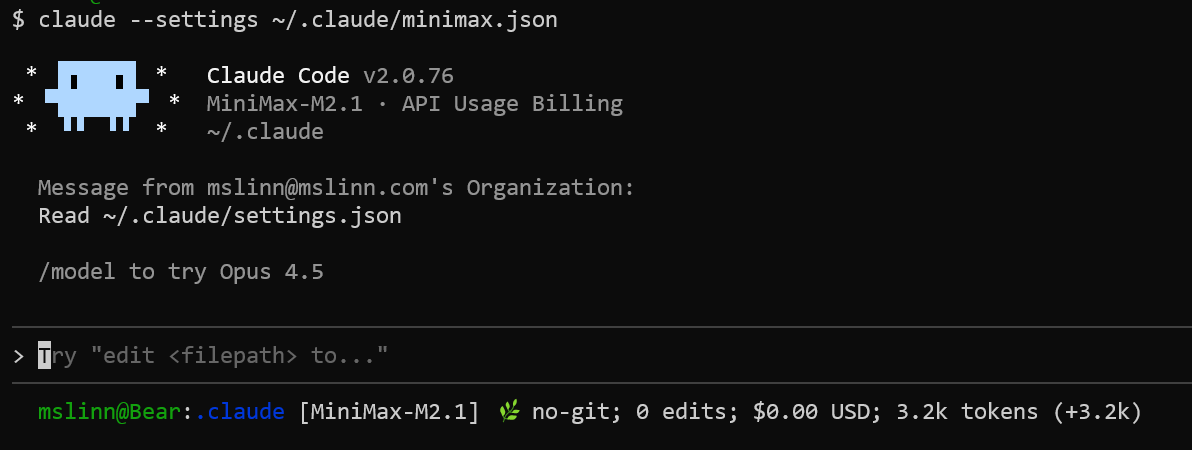
MiniMax-M2/3 Review discusses the MiniMax M2.x and M3.x LLMs in general. This article provides a sample configuration for MiniMax M3.1-Flash that you can use to quickly get this working. That sample configuration does not contain any credentials. This article shows you how to provide credentials.
By default, Claude Code keeps its settings, transcripts, history and plugins
in ~/.claude. I defined the CLAUDE_CONFIG_DIR
environment variable to tell Claude CLI to use a different configuration directory,
~/.minimax_public.
Anthropic sessions do not know
that MiniMax exists, and vice-versa
Why a Separate Configuration Directory
The structure of a Claude configuration directory tree includes:
-
settings.json— the user settings file -
.claude.json— account details, per-project trust decisions, global configuration -
CLAUDE.md— your global instructions -
projects/— session transcripts, one subdirectory per project -
history.jsonl— command history -
plugins/,skills/,agents/,tasks/,plans/,shell-snapshots/,file-history/,debug/
Project-scoped files are not relocated.
.claude/settings.json, .claude/settings.local.json,
.claude/CLAUDE.md and .mcp.json are always read
from the project directory. An Anthropic session and a MiniMax session
working in the same project still share
.claude/settings.local.json. More on this below.
The Directory Layout
This is what ~/.minimax_public looks like:
~/.minimax_public/
  ├── settings.json      endpoint, model, permissions
  ├── .claude.json       written by Claude Code on first run
  ├── projects/          transcripts, one subdirectory per project
  └── history.jsonl      command history
Only the first file is authored by hand. The rest are created on their own as you use Claude Code.
Installing and Authenticating
Create the directory:
$ mkdir ~/.minimax_public
Put your MiniMax API token in a file that lives outside that directory, and make sure only you can read it:
$ mkdir -p ~/.minimax

$ touch ~/.minimax/token

$ chmod 600 ~/.minimax/token
The token is a 695-character JWT, the same string MiniMax hands out when you
subscribe to a coding plan. You need to somehow copy the token into
~/.minimax/token.
Define an alias that launches Claude Code with the MiniMax configuration directory, injecting the token into the environment for that one command:
alias minimax='ANTHROPIC_AUTH_TOKEN="$(cat ~/.minimax/token)" CLAUDE_CONFIG_DIR=~/.minimax_public claude'
Now type minimax at a command prompt.
Using the alias in this way confines the token to this single invocation. Any
previous value of export ANTHROPIC_AUTH_TOKEN is temporarily
ignored.
A Shell Function Does Better
An alias cannot take arguments, and it fails unhelpfully when the token file
is missing. $(cat missing) yields an empty string, Claude Code
launches anyway, and you get a 401 with no hint as to the cause. A shell
function can report the problem and pass arguments through:
minimax() {
  local t
  t=$(cat "$HOME/.minimax/token" 2>/dev/null) || { echo "no token"; return 1; }
  ANTHROPIC_AUTH_TOKEN="$t" CLAUDE_CONFIG_DIR="$HOME/.minimax_public" claude "$@"
}
One advantage of the variable assignment: the token never reaches
argv. It goes into the environment, not the command line, so it
does not show up in ps output.
The Documented Alternative: apiKeyHelper
Claude Code has a setting called
apiKeyHelper,
which runs a command of your choosing and uses the command’s standard
output as the credential:
{
  "apiKeyHelper": "cat $HOME/.minimax/token"
}
Nothing is required in your shell and no alias is needed. More to the point,
the helper is read from the settings file, so it only runs when
CLAUDE_CONFIG_DIR points at the MiniMax directory. Launch plain
claude and Claude Code reads ~/.claude/settings.json,
which has no helper. Your Anthropic sessions are untouched.
If you keep the token in a password manager rather than in a file, this is the way to go. The helper can be any command.
There is one catch. The apiKeyHelper output is sent as
both the Authorization: Bearer header and the
x-api-key header. MiniMax’s endpoint is happy with
bearer authentication, which is what the alias above sends and nothing else.
I have not tested whether it tolerates the extra x-api-key
header, so the alias remains my recommendation.
settings.json
Here is the whole file:
{
  "env": {
    "ANTHROPIC_BASE_URL": "https://api.minimax.io/anthropic",
    "ANTHROPIC_MODEL": "minimax-m3.1-flash[1m]",
    "ANTHROPIC_DEFAULT_SONNET_MODEL": "minimax-m3.1-flash[1m]",
    "ANTHROPIC_DEFAULT_OPUS_MODEL": "minimax-m3.1-flash[1m]",
    "ANTHROPIC_DEFAULT_HAIKU_MODEL": "minimax-m3.1-flash[1m]",
    "CLAUDE_CODE_DISABLE_NONESSENTIAL_TRAFFIC": "1"
  },
  "permissions": {
    "allow": [
      "Bash(git status:*)",
      "Bash(git diff:*)"
    ],
    "defaultMode": "bypassPermissions"
  },
  "model": "minimax-m3.1-flash[1m]",
  "enabledPlugins": {
    "gopls-lsp@claude-plugins-official": true
  },
  "skipDangerousModePermissionPrompt": true
}
Some notes on the individual keys.
-
ANTHROPIC_BASE_URL— MiniMax’s Anthropic-compatible endpoint. The global platform isapi.minimax.io; the China platform isapi.minimaxi.com. -
ANTHROPIC_MODEL— the model, with the[1m]suffix. That suffix is doing real work. I explain it below. -
ANTHROPIC_DEFAULT_SONNET_MODELand its Opus and Haiku siblings do not choose the model. They define what the aliasessonnet,opusandhaikuresolve to. Pointing all three at the same model means/model sonnetcannot land on an Anthropic model with a 200,000-token window. -
CLAUDE_CODE_DISABLE_NONESSENTIAL_TRAFFICsuppresses telemetry, update checks and remote feature flags. It cuts startup latency, and it keeps Anthropic-specific traffic out of a session that is not talking to Anthropic. -
permissions.defaultModechooses the approval mode that new sessions start in. I discuss it below. -
permissions.allowlists commands that never need to ask. The rules are matched per tool and per command prefix. -
modelis the model for new sessions when neither the command line nor the environment says otherwise. I keep it identical toANTHROPIC_MODELfor the reason described below. -
enabledPlugins— plugins are installed under the configuration directory too, so enabling one here does not enable it for my Anthropic sessions. -
skipDangerousModePermissionPromptanswers the confirmation dialog that precedes the dangerous permission mode.
Note what is not in that file: a credential. There is no
ANTHROPIC_API_KEY either, and that omission is deliberate.
ANTHROPIC_AUTH_TOKEN is sent as
Authorization: Bearer and ANTHROPIC_API_KEY is
sent as x-api-key. Setting both does not make Claude Code pick
one. Both headers go out on the wire.
One more trap, since it is the obvious thing to try:
"ANTHROPIC_AUTH_TOKEN": "${MINIMAX_TOKEN}" does not work.
Claude Code copies the values in an env block into the process
environment verbatim; no shell processes them. The literal string
${MINIMAX_TOKEN} goes to MiniMax, which rejects it. The same
applies to ~: a path in a settings file must be absolute.
The 1,000,000 Token Context Window
Claude Code decides how large the context window is by looking at the model name. For a model it does not recognize, it assumes 200,000 tokens, and it says so:
Model "minimax-m3.1-flash" isn't recognized · context assumed to be 200k tokens
MiniMax M3.1 Flash has a much larger window than that. The provider was never the constraint. Claude Code’s own bookkeeping was.
The fix is the [1m] suffix on the model id. Claude Code
recognizes the suffix, raises its assumption to 1,000,000 tokens, and adds
the context-1m beta header to the request. The suffix is
stripped before the model id leaves the machine, so the provider never sees
it. MiniMax receives a request for minimax-m3.1-flash and
nothing more.
Before I found this, auto-compaction was firing just under 200,000 tokens. The peak in my session transcripts was 166,329.
There are four levers, and only one of them raises the window:
-
[1m]on the model name — the window becomes 1,000,000. -
CLAUDE_CODE_AUTO_COMPACT_WINDOW— where auto-compaction fires inside the window. It can only ever lower the window, never raise it. -
DISABLE_COMPACT=1together withCLAUDE_CODE_MAX_CONTEXT_TOKENS=1000000— sets the window and turns auto-compaction off entirely./compactstill works by hand. -
CLAUDE_CODE_DISABLE_1M_CONTEXT=1— switches the 1,000,000-token path off.
CLAUDE_CODE_MAX_CONTEXT_TOKENS is ignored on the
[1m] path unless compaction is disabled. The model name has to
carry the marker first. The threshold setting only becomes useful afterwards,
where it decides where compaction fires inside the large window.
I use the [1m] marker on its own, because auto-compaction stays
on as a safety net.
The 1,000,000-token window is Claude Code’s assumption, not a statement
about MiniMax’s server. If MiniMax rejects a large request, lower
CLAUDE_CODE_AUTO_COMPACT_WINDOW. Do not reach for
CLAUDE_CODE_MAX_CONTEXT_TOKENS.
Which Model Is Actually Running
Claude Code has three places to look for a model, and they do not agree by default:
-
the
--modelcommand line flag -
the
ANTHROPIC_MODELenvironment variable -
the
modelkey in a settings file
In that order. The environment variable beats the settings file.
This caught me. My settings file said minimax-m3.1-flash and
the environment said MiniMax-M2.5. Every message in my session
transcripts recorded "model": "MiniMax-M2.5". The settings file
was decoration.
Keep the two in agreement. Use /status to see what you actually
got.
Permissions and Approval Modes
Claude Code asks permission before it edits a file or runs a command. The
permissions.defaultMode key chooses the mode that new sessions
start in:
-
default— ask for everything. -
acceptEdits— file edits are approved automatically; commands still prompt. A reasonable middle ground. -
plan— research and plan, without touching anything. -
bypassPermissions— nothing prompts. The agent edits files and runs commands without asking.
bypassPermissions means the agent can do anything you can. I use
it because I want to see what MiniMax does without answering a prompt every
thirty seconds. Think hard about it before you point it at a directory you
care about.
Two things about it. It is only honored in the user settings file
— the one in your configuration directory — as of Claude Code
v2.1.123. In a project or local settings file it is ignored. And it can be
refused: permissions.disableBypassPermissionsMode set to the
string "disable" prevents anyone from entering the mode, and
skipDangerousModePermissionPrompt answers the confirmation
dialog so it is not asked for on every launch.
The permissions.allow list holds the rules for commands that
never need to ask. A rule is a tool name, optionally followed by a
specifier:
-
Bashmatches every Bash command. -
Bash(npm run build)matches that exact command. -
Bash(npm run *)matches the family. The:*suffix is an equivalent spelling, and it is only recognized at the end of a pattern.
What the Claude Code CLI Does Better
These are the reasons I stopped using Mini-Agent and drove MiniMax through the Claude Code CLI instead.
Esc Works!
😱Pressing the Esc key interrupts MiniMax when the Claude Code CLI is used. Mini-Agent has no way to interrupt or guide the agent once it starts executing something. Your only option is to kill the session and start over, wasting money and time.
That one difference is worth the setup.
Web Search Still Broken
😒Even with the Claude Code CLI, the MiniMax web search still does not work. Claude performs web searches server-side, so using the Claude CLI does not give MiniMax the ability to perform web searches. They claim Anthropic compatibility, but this important ability is badly broken.
The fix is to stop asking for the Anthropic tool and to call a program instead. See MiniMax Web Search with ddgr.
Solved: Missing Unit Tests
Mini-Agent habitually writes tests in a temporary directory, so they are never used again. The result is very few useful tests. Everything I tried was unable to modify this behavior.
The Claude Code CLI asks for permission to create new files by default. That lets me tell MiniMax to write new files containing new unit tests into the project structure.
Only One Claude Code CLI Instance Per Project
Due to a Claude Code CLI bug, .claude/settings.local.json gets
messed up if more than one copy of Claude Code CLI is running in the same
project. You cannot run Claude CLI instances for Anthropic LLMs and MiniMax
simultaneously in the same directory.
Error: EINVAL: invalid argument, watch '/mnt/f/studio_control/.claude/settings.local.json.tmp.2105190.1767567982438'
    at watch (unknown)
    at new FSWatcher (node:fs:30:31)
    at watch (node:fs:300:23)
This is the one place where the isolation does not help, because
.claude/settings.local.json is resolved from the project
directory and is never relocated by CLAUDE_CONFIG_DIR. Both
sessions contend for the same file, and a standing approval granted in one
is visible to the other.
The workaround is to keep MiniMax permission rules in the configuration
directory’s settings.json, where they apply to every
project, rather than in the project’s
.claude/settings.local.json.
The First Run
A brand new configuration directory triggers the onboarding wizard once: it asks about your theme and about terminal setup. After that it does not ask again. The wizard writes its answers into the new directory, so my Anthropic configuration is untouched.
Claude Code also keeps .claude.json in the configuration
directory, holding account details and per-project trust decisions. The
MiniMax directory has never seen my projects, so it has no trust decisions
for them. I am asked to trust a project the first time I work in it with
MiniMax.
Conclusion
MiniMax’s Anthropic-compatible endpoint is good enough to run an agentic coding harness against, and the Claude Code CLI is a much better harness than Mini-Agent. What I could not find was a way to point one at the other without trampling on my Anthropic configuration.
CLAUDE_CONFIG_DIR is that way, and it took me an embarrassingly
long time to notice it was already a supported feature.
The advice generalizes. Any agentic harness that keeps its configuration in a directory can be run side by side with another one, provided you know where the harness looks for that directory. Read the settings reference before you assume a tool only works one way.
References