
Published 2024-03-20.
Last modified 2026-10-21.
Time to read: 5 minutes.
av_studio collection.
This software is for non-commercial purposes only. Please read the licence for further details, and contact the author for a commercial licence.


I created the live_set project because I was having problems transferring some
Ableton Live sets to Push 3 Standalone (P3S). The information provided by
Ableton Live was insufficient to understand what the problems were.
The live_set project is packaged as a Ruby gem. Three commands
are provided: als_delta, generate_xsd, and live_set. Although these programs
should work to some degree with all versions of Ableton Live, they have only
been tested with Live 8.6, 11 and 12.
Generate_xsd
This is the help message for the generate_xsd command:
Generate_xsd reads one or more Ableton Live sets and generates an XSD with the
given name.

Syntax: generate_xsd OPTIONS XSD_FILE_NAME PATH_TO_ALS_FILE...

Environment variables used in XSD_FILE_NAME and PATH_TO_ALS_FILE are expanded.

Options are:
-f overwrite any existing xsd.
-h Display this help message.

Example:
generate_xsd xsd_file_name -f $path/to/my_v12_set.als
Live_set
The live_set command can:
- Make a copy of an Ableton Live 12 set and save it in Live 11 format.
- Report the version compatibility of an Ableton Live set.
-
Detect environmental problems, for example, unwanted directories called
Ableton Project Infoin parent directories. - Display the location and size of the samples in each track.
-
Clearly show if a Live set is ready to be transferred to a Push 3
Standalone, and what needs to be changed if not.
- Detects sets that are too large to be frozen, which means they are too large to transfer to P3S.
- Shows audio tracks with non-Ableton plugins that are not frozen, which means they are not ready to be transferred to P3S.
- Shows clips that have not been collected within the set’s project directory.
Live_set has successfully converted the Ableton
Live 12 demo project to Live 11. It converts a copy of the original, so the original set is
unaltered.
Als_delta
The als_delta command can show detailed changes to the XML
definition for the Live set as you work on the set.
This command is not yet functional.
Installation
Simply type:
$ gem install live_set
If the above does not work because you need to install Ruby, please follow the instructions in Setting Up a Ruby Development Environment.
Upgrading
Simply type:
$ gem upgrade live_set
Usage
Help Messages
$ live_set
Displays information about a Live set or converts a copy of a Live 12 set in Live 11 format.
Also verifies that 'Ableton Project Info' is in the same directory as the .als file,
and there is no parent directory with a directory of that name.

Syntax: live_set OPTIONS PATH_TO_ALS_FILE

Environment variables used in PATH_TO_ALS_FILE are expanded.

Options are:
  -11 Convert a copy of the Live 12 set to Live 11 format.
  -f Overwrite any existing Live 11 set.
  -h Display this help message.

Example:
  live_set -11 -f $path/to/my_set.als
$ als_delta
ls_delta: Shows changes to an .als file.
Press enter to compare with the previous version.

Syntax: ls_delta OPTIONS PATH_TO_ALS_FILE

Environment variables used in PATH_TO_ALS_FILE are expanded.

Options are:
  -k Keep each backup (default is to delete them)
  -h Display this help message.

Example:
ls_delta $path/to/my_v12_set.al
Report
Report information about the Ableton Live 12 Demo Project:
$ live_set "$ableton_media/Projects/Ableton Live 12 Demo Project/Ableton Live 12 Demo.als"
/mnt/e/media/Ableton/Projects/Ableton Live 12 Demo Project/Ableton Live 12 Demo.als
  Created by Ableton Live 12.0
  Major version 5
  Minor version v12.0_12049
  SchemaChangeCount 7
  Revision 5094b92fa547974769f44cf233f1474777d9434a
Total set size: 312.5 MB
Warning: some tracks are not frozen, so this set should not be transferred to P3S.
4 tracks:
  Track 'Vocal Main' (12 clips, totaling 154.0 MB)
    Samples/Imported/Vocal Patience Main.wav   12.8 MB  2024-01-31 22:00:34
    Samples/Imported/Vocal Patience Main.wav   12.8 MB  2024-01-31 22:00:34
    Samples/Imported/Vocal Patience Main.wav   12.8 MB  2024-01-31 22:00:34
    Samples/Imported/Vocal Patience Main.wav   12.8 MB  2024-01-31 22:00:34
    Samples/Imported/Vocal Patience Main.wav   12.8 MB  2024-01-31 22:00:34
    Samples/Imported/Vocal Patience Main.wav   12.8 MB  2024-01-31 22:00:34
    Samples/Imported/Vocal Patience Main.wav   12.8 MB  2024-01-31 22:00:34
    Samples/Imported/Vocal Patience Main.wav   12.8 MB  2024-01-31 22:00:34
    Samples/Imported/Vocal Patience Main.wav   12.8 MB  2024-01-31 22:00:34
    Samples/Imported/Vocal Patience Main.wav   12.8 MB  2024-01-31 22:00:34
    Samples/Imported/Vocal Patience Main.wav   12.8 MB  2024-01-31 22:00:34
    Samples/Imported/Vocal Patience Main.wav   12.8 MB  2024-01-31 22:00:34

  Track 'Vocal Harmony' (12 clips, totaling 154.0 MB)
    Samples/Imported/Vocal Patience Harmony.wav   12.8 MB  2024-01-31 22:00:04
    Samples/Imported/Vocal Patience Harmony.wav   12.8 MB  2024-01-31 22:00:04
    Samples/Imported/Vocal Patience Harmony.wav   12.8 MB  2024-01-31 22:00:04
    Samples/Imported/Vocal Patience Harmony.wav   12.8 MB  2024-01-31 22:00:04
    Samples/Imported/Vocal Patience Harmony.wav   12.8 MB  2024-01-31 22:00:04
    Samples/Imported/Vocal Patience Harmony.wav   12.8 MB  2024-01-31 22:00:04
    Samples/Imported/Vocal Patience Harmony.wav   12.8 MB  2024-01-31 22:00:04
    Samples/Imported/Vocal Patience Harmony.wav   12.8 MB  2024-01-31 22:00:04
    Samples/Imported/Vocal Patience Harmony.wav   12.8 MB  2024-01-31 22:00:04
    Samples/Imported/Vocal Patience Harmony.wav   12.8 MB  2024-01-31 22:00:04
    Samples/Imported/Vocal Patience Harmony.wav   12.8 MB  2024-01-31 22:00:04
    Samples/Imported/Vocal Patience Harmony.wav   12.8 MB  2024-01-31 22:00:04

  Track 'Vocal Hum' (1 clips, totaling 2.9 MB)
    Samples/Imported/Vocal Patience Hum.wav    2.9 MB  2024-01-31 22:03:22

  Track 'Vocal Adlib' (2 clips, totaling 1.7 MB)
    Samples/Imported/Vocal Patience Adlib.wav  827.9 kB  2024-01-31 22:00:22
    Samples/Imported/Vocal Patience Adlib.wav  827.9 kB  2024-01-31 22:00:22
Convert
Make a Live 12 set compatible with Live 11 and save as path/to/my_set_11.als:
$ live_set -11 -f path/to/my_set.als
This command will not convert older versions to Live 11 format; use Ableton
Live for that. When Live 13+ is released, this command is unlikely to convert
Live 13 sets to earlier versions correctly unless an update to
live_set is released.
Show Changes
Show changes to path/to/my_set.als:
$ als_delta path/to/my_set.als
Exploration
Let’s use live_set to learn exactly what Ableton
Live’s File / Collect All and Save menu item does.
- Create a new Live set: CTRL-N. The default Ableton Live set has 2 empty MIDI tracks and 2 empty Audio tracks.
-
Drag an MP3 file into the large center area of Live that says Drop Files and Devices Here.
I dragged in a file called
E:\music\Passacaglia - Kapsberger.mp3, which was 2.606 MB. - Click on the new clip and disable Warp down below in the Clip panel.
-
Save the new Live set. I saved to
E:\media\Ableton\Projects\Test1, which caused Ableton Live to create a directory calledE:\media\Ableton\Projects\Test1 Project. The directory listing was:Shell$ ls -1 'Ableton Project Info'/ Desktop.ini* Test1.als* -
Use
live_setto display the audio tracks in the set:Shell$ live_set Test1.als Test1.als Created by Ableton Live 11.3.22 Major version 5 Minor version v11.0_11300 SchemaChangeCount 3 Revision 86c4913d7978d564614e61d7105424edb3d2ee4b Total set size: 2.7 MB Warning: some tracks are not frozen, so this set should not be transferred to P3S. 3 tracks: Track '3-Audio' (0 clips, totaling 0.0 bytes)
Track '4-Audio' (0 clips, totaling 0.0 bytes)
Track '5-Passacaglia - Kapsberger' (1 clips, totaling 2.7 MB) ../../../../music/Passacaglia - Kapsberger.mp3 2.7 MB 2023-02-23 09:28:31
We can see that the MP3 file does not reside within the Ableton Live set directory. Instead, its path relative to the Live set directory is../../../../music/Passacaglia - Kapsberger.mp3. -
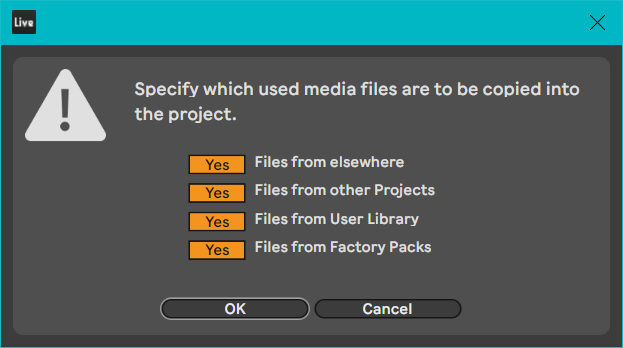
Use the File / Collect All and Save menu item.
-
Use
live_setagain to display the set:Shell$ live_set Test1.als Test1.als Created by Ableton Live 11.3.22 Major version 5 Minor version v11.0_11300 SchemaChangeCount 3 Revision 86c4913d7978d564614e61d7105424edb3d2ee4b Total set size: 2.7 MB Warning: some tracks are not frozen, so this set should not be transferred to P3S. 3 tracks: Track '3-Audio' (0 clips, totaling 0.0 bytes)
Track '4-Audio' (0 clips, totaling 0.0 bytes)
Track '5-Passacaglia - Kapsberger' (1 clips, totaling 2.7 MB) Samples/Imported/Passacaglia - Kapsberger.mp3 2.7 MB 2023-02-23 09:28:31
We can see that Collect All and Save placed a copy of the MP3 file in a new directory within the Live set calledSamples/Imported/. - Now that a copy of the MP3 file resides within the Live set directory tree, we can freeze the track.
-
Once the track is frozen,
live_setshows we are ready to transfer the set to P3S.Shell$ live_set Test1.als Test1.als Created by Ableton Live 11.3.22 Major version 5 Minor version v11.0_11300 SchemaChangeCount 3 Revision 86c4913d7978d564614e61d7105424edb3d2ee4b Ready for transfer to P3S Total set size: 2.7 MB 3 tracks: Track '3-Audio' (0 clips, totaling 0.0 bytes)
Track '4-Audio' (0 clips, totaling 0.0 bytes)
Track '5-Passacaglia - Kapsberger' (1 clips, totaling 2.7 MB) Samples/Imported/Passacaglia - Kapsberger.mp3 2.7 MB 2023-02-23 09:28:31
Samples/Collected/.”
live_set shows that audio files are actually copied to Samples/Imported/.
Background
Gzip Files
Ableton Live .als files are stored in gzip format, which
7-zip can open.
If you know how to use the bash command line,
another way to work with gzip files is to use the
zcat, zless, zgrep and zdiff commands.
Gzip files are often saved with a .gz file name extension; however,
other file extensions can be used.
Unlike zip files, which are portable yet independent file systems
that can contain many individual files,
gzip files merely consist of one compressed file.
Ableton Live Set Directory Structure
A minimal Ableton Live set is a directory tree containing the following:
-
An
.alsfile, which defines the structure and some of the content. This file is in XML format, compressed usinggzip, with an.alsfile name extension. -
A subdirectory named
Ableton Project Info. This directory is merely a marker; Live does not examine its contents. However, it is common for a file calledAProject.icoto be placed inside.
Note that a Live set’s parent directories should not contain anyAbleton Project Infosubdirectories. ExtraAbleton Project Infosubdirectories can cause Live to become confused as to what the boundaries of a Live set are. TheLive_setcommand checks for this problem and, if found, asks if you want the problem to be corrected.
Live projects can also contain other directories and files. For example, when
the menu item File / Collect All and Save is used, clips stored
outside the Live set directory tree that had been dragged into the project
will be copied into a subdirectory called Samples/Imported/
within the Live set directory tree.
Manually Downgrading A Live Set
The following incantation displays the first two lines of a Live set
definition file called
path/to/my_set.als.
The output is folded so you can read it easily:
$ zcat path/to/my_set.als | head -n 2
<?xml version="1.0" encoding="UTF-8"?>
    <Ableton MajorVersion="5"
    MinorVersion="12.0_12049"
    SchemaChangeCount="7"
    Creator="Ableton Live 12.0"
    Revision="5094b92fa547974769f44cf233f1474777d9434a">
If a Live 12 set does not use any Live 12 features,
it can be converted to Live 11 format as described in the following steps.
The live_set command works in a similar manner,
although the program is written in the Ruby language instead of English.
-
Change the second line of the XML file to:
Line 2 of my_set.als
<Ableton MajorVersion="5"
  MinorVersion="11.0_11300"
  SchemaChangeCount="3"
  Creator="Ableton Live 11.3.21"
  Revision="5ac24cad7c51ea0671d49e6b4885371f15b57c1e">
-
Delete the
<ContentLanes/>,<ExpressionLanes/>,<InstrumentMeld/>,<Roar/>and<MxPatchRef/>sections. -
Change all instances of
AudioOut/MaintoAudioOut/Master. Must we be so ridiculously woke? Others agree with my sentiment. - Save the modified XML as a new file. This new file is only needed for the next step.
-
Compress the XML file using
gzipand save it in the same directory with an.alsfile type. - Delete the uncompressed XML file, unless you want to continue to experiment with it.
Development
After checking out this Git repository, install dependencies by running
bin/setup:
$ git clone https://github.com/mslinn/live_set

$ cd live_set

$ bin/setup

$ code .  # Run Visual Studio Code
Run the Tests
$ bundle exec rake test
Debug run
Define the VO_DEBUGGING environment variable so the code is
loaded from the project instead of attempting to load the
live_set gem.
$ VO_DEBUGGING=true ruby exe/live_set /path/to/my_set.als
Interactive Session
The following will allow you to experiment:
$ bin/console
Local Installation
To install this gem onto your local machine, type:
$ bundle exec rake install
Live XML Schemas
Each version of Ableton Live has a slightly different XML schema. Ableton does not publish these schemas. When writing this program it is often helpful to have an XSD file for the Ableton Live session formats in use. It is possible to generate XSD files from XML files; the resulting XSD will based solely on the contents of the XML files.
At first, I used the Trang command-line multi-format
schema converter. It worked well, but because Trang is written in Java, it did
not integrate into my Ruby software. I then added a new command to
Live_set called generate_xsd.
generate_xsd
The more Live sets you process with generate_xsd that were created with exactly the same
version of Ableton Live, the more complete the XSD will be.
If you only have one Ableton Live set to examine, run as follows:
$ generate_xsd -f xsd_file_name $path/to/ableton_live_set1.als
If you only have more than one Ableton Live set to examine, and they were all created with exactly the same version of Ableton Live, run as follows:
$ generate_xsd -f \
  xsd_file_name \
  $path/to/ableton_live_set1.als \
  $path/to/ableton_live_set2.als
Trang
I created a Live 12 schema
by feeding the Ableton Live 12 demo project
(C:\ProgramData\)
to Trang:
$ yes | sudo apt install default-jre trang

$ find /usr/share/ /usr/lib/ -name "trang.jar" 2>/dev/null
/usr/share/java/trang.jar

$ alias trang='java -jar /usr/share/java/trang.jar'

$ ALS_FILE='C:\ProgramData\Ableton\Live 12 Suite\Resources\Core Library\Lessons\Chuck Sutton - Patience (Live 12 Standard Demo).als)'

$ trang \
  -I xml \
  -O xsd \
  <(gunzip -c "$ALS_FILE") \
  ableton_live_12.xsd
Testing the XSD
The validate_als bash script can verify that an XSD matches an
Ableton Live set:
#!/usr/bin/env bash

if [[ $# -ne 2 ]]; then
  echo "Usage: $0 SET.als SCHEMA.xsd" >&2
  exit 2
fi

als=$1
xsd=$2

if [[ ! -f "$als" ]]; then
  echo "Error: ALS file not found: $als" >&2
  exit 2
fi

if [[ ! -f "$xsd" ]]; then
  echo "Error: XSD file not found: $xsd" >&2
  exit 2
fi

if ! command -v xmllint >/dev/null 2>&1; then sudo apt install libxml2-utils; fi
if ! command -v gzip    >/dev/null 2>&1; then sudo apt install gzip; fi
if ! command -v xmllint >/dev/null 2>&1; then sudo apt install libxml2-utils; fi

xml=$(mktemp) || exit 2
trap 'rm -f "$xml"' EXIT

if ! gzip -dc -- "$als" > "$xml"; then
  echo "Error: could not decompress ALS file: $als" >&2
  exit 1
fi

xmllint --noout --schema "$xsd" "$xml"
Set the script executable:
$ chmod +x validate_als
Use like this:
$ validate_als schema12.xsd "My Live Set.als"
To Release A New Version
To create a Git tag for the new version, push Git commits and tags, and push
the new version of the gem to rubygems.org, type:
$ bundle exec rake release